
If you’re planning a WordPress website in 2026, here is the short answer: a professional small-business WordPress site typically costs between $399 and $699 and takes about 7 working days to build, while an ecommerce build runs $699 to $1,200 USD and takes around 15 working days. Those are real, current project bands — not vague estimates pulled from thin air. The catch is that “WordPress website” covers everything from a five-page brochure site to a full online store with memberships and third-party integrations, and the final number depends on scope, design ambition, and who builds it. This guide breaks down exactly what goes into WordPress website development cost in 2026 — the factors that move the price, realistic costs by site type, the hidden ongoing expenses most quotes leave out, and how to get an accurate quote without the runaround. If you want the build handled by people who do this every day, take a look at our WordPress development services.
WordPress Website Development Cost in 2026: The Short Answer
Let’s lead with the numbers, because that’s why you’re here. For a professionally built WordPress website in 2026, expect these bands:
- Simple business website (5–10 pages): $399–$699, delivered in about 7 working days.
- Ecommerce website: $699–$1,200 USD, delivered in about 15 working days.
- Large or fully custom builds (membership areas, marketplaces, complex integrations): quoted per project after a proper discovery call — there is no honest flat number for these.
These bands reflect what an experienced agency charges for a complete, launch-ready build: design, development, basic on-page SEO setup, testing across devices, and handover. They do not reflect DIY builds (where you trade money for your own time) or the cheapest offshore gig listings (where you trade money for risk). Both of those are legitimate choices in the right situations — we’ll compare them honestly later in this guide.
One thing to understand up front: WordPress itself is free, open-source software. You are never paying for a license. What you pay for is the design, the build, the configuration, the content setup, and the expertise that keeps the whole thing from breaking three months later. Keep that distinction in mind, because it explains almost every pricing surprise in the sections below.
What Goes Into WordPress Website Development Cost?
Two quotes for a “WordPress website” can differ by thousands of dollars and both be perfectly honest — because the scope behind them is completely different. Here are the seven factors that actually move the price, roughly in order of impact:
1. Number and complexity of pages. A five-page brochure site is a fundamentally different project from a forty-page site with service-area pages, team bios, and a resource library. More pages means more design layouts, more content formatting, and more testing.
2. Custom design vs. premium theme. Starting from a premium theme with your branding applied is faster and cheaper. A fully custom design — wireframes, unique layouts for every template, bespoke animations — costs more but gives you a site nobody else has. (More on this trade-off below.)
3. Functionality beyond pages. This is the big one. Contact forms are cheap; booking systems, membership logins, multilingual setups, custom quote calculators, and LMS features are not. Every interactive feature adds design, build, and testing time.
4. Ecommerce requirements. Product setup, payment gateways, shipping rules, tax configuration, and checkout testing turn a website project into a store project. That’s why ecommerce sits in its own price band.
5. Content creation. Many quotes assume you provide finished copy and images. If you need copywriting, stock imagery, or product photography, that is either an extra line item or extra hours — and it’s worth budgeting for, because great design can’t rescue weak content.
6. Integrations. Connecting your CRM, email marketing, booking software, or analytics properly takes real configuration work — plus ongoing attention when APIs change.
7. SEO and performance setup. Technical SEO basics (clean URLs, meta templates, sitemaps, schema), speed optimization, and Core Web Vitals tuning should be baked into the build, not bolted on later.
| Cost factor | What it means in practice | Impact on price |
|---|---|---|
| Page count & layouts | More unique templates = more design and build time | Medium |
| Custom design vs theme | Bespoke design costs more than a customized premium theme | High |
| Ecommerce functionality | Products, payments, shipping, checkout testing | High |
| Advanced features | Memberships, bookings, multilingual, custom tools | High |
| Copywriting & imagery | Professional content vs client-supplied | Medium |
| Third-party integrations | CRM, email, analytics, booking systems | Medium |
| SEO & speed setup | Technical foundations baked into the build | Low–Medium |
WordPress Website Cost by Site Type
Here’s how those factors combine into realistic 2026 pricing for the projects businesses actually commission:
| Site type | Typical scope | Investment | Build time |
|---|---|---|---|
| Simple business website | 5–10 pages, contact forms, blog, mobile-responsive | $399–$699 | ~7 working days |
| Ecommerce store | Product catalog, cart, checkout, payment gateway | $699–$1,200 USD | ~15 working days |
| Custom / large builds | Memberships, marketplaces, complex integrations, multilingual | Quoted per project | Scoped after discovery |
| DIY build | You build it with a theme and page builder | Your time + yearly domain, hosting & license costs | Weeks of evenings |
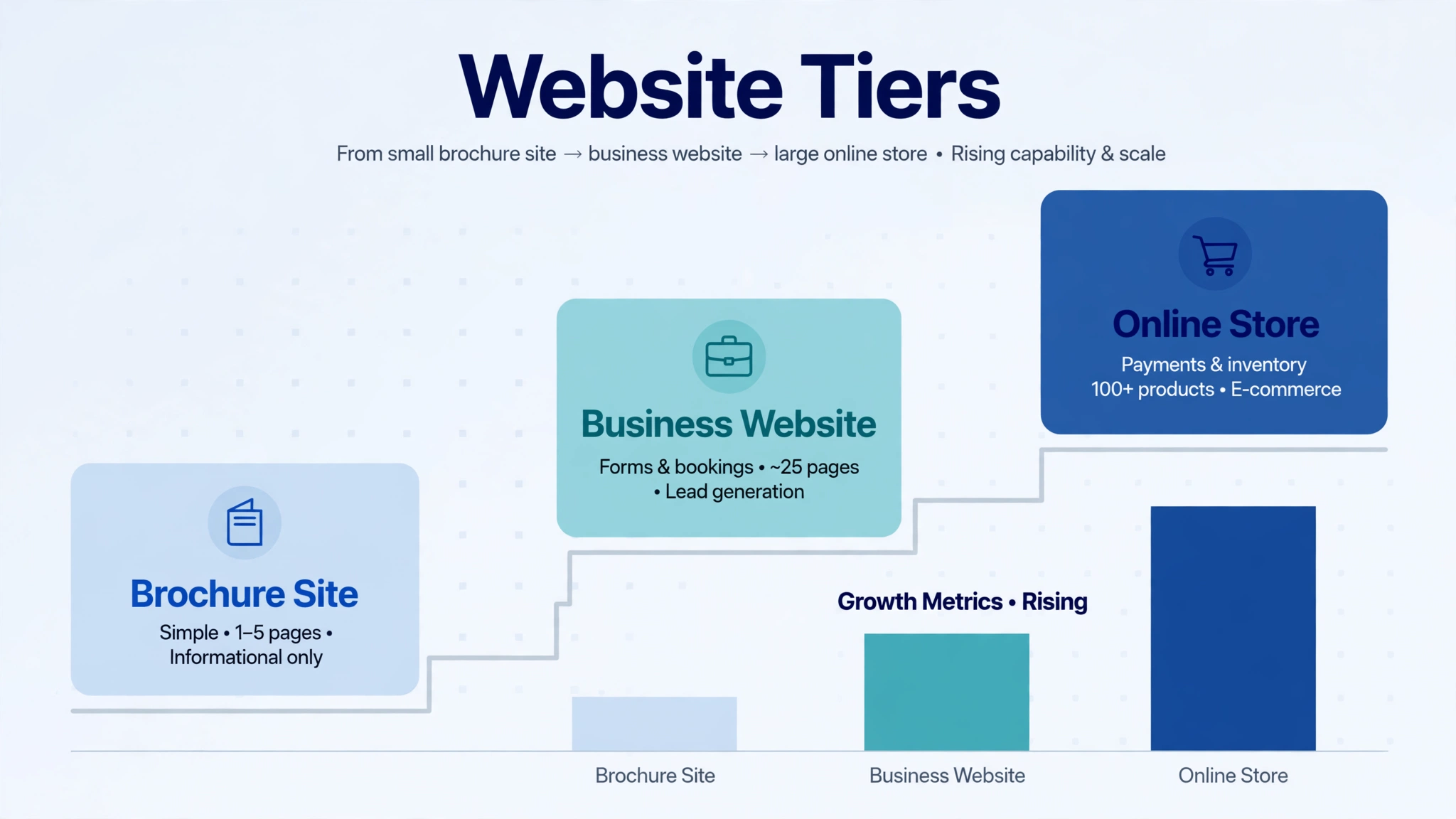
A note on the DIY row: building it yourself is genuinely viable for a simple site if you’re comfortable with technology and have the time. The real cost is your hours — and the risk that a half-finished site sits unpublished for months while competitors take the enquiries. For anything that needs to generate leads or sales, professional build quality usually pays for itself.
Wondering how WordPress pricing compares to other platforms? Our Webflow development cost breakdown covers the same bands from the Webflow side, and our Webflow vs WordPress comparison looks at the total cost of ownership beyond the build itself.
Custom Development vs Premium Theme: What’s Worth Your Money?
This is the decision that confuses buyers most, so let’s be direct. A premium theme is a pre-built design you buy once and customize with your colors, fonts, logo, and content. Custom development means the design is created for your business from scratch. Neither is “better” — they solve different problems.
| Premium theme build | Custom design & build | |
|---|---|---|
| Design uniqueness | Built on a shared framework; recognizable patterns | One of a kind, designed around your brand |
| Upfront investment | Lower — fits the $399–$699 band for simple sites | Higher — design hours are real hours |
| Build speed | Faster (structure already exists) | Slower (design phase comes first) |
| Performance | Depends on the theme — bloated themes are slow | Lean code, easier to keep fast |
| Flexibility | Limited by what the theme supports | Any layout or feature you can spec |
| Best for | Startups and small businesses that need to launch fast | Established brands competing on differentiation |
Our honest take: for most small businesses, a well-chosen premium theme customized properly by an experienced developer beats a cheap “custom” design every time. True custom design earns its keep when your brand, your conversion strategy, or your functionality genuinely can’t fit inside a theme — not as a default. Be wary of anyone selling “fully custom” at theme prices; something has to give, and it’s usually quality or support.
Hidden Costs That Blow Up WordPress Website Budgets

The build quote is only part of the story. WordPress sites have ongoing costs that surprise first-time owners because nobody mentions them during the sales call. Budget for these from day one:
| Expense | What it covers | How it’s billed |
|---|---|---|
| Domain name | Your web address (yoursite.com) | Yearly renewal |
| Hosting | The server your site lives on — quality matters enormously for speed | Monthly or yearly |
| Premium theme/plugin licenses | Page builders, form tools, SEO plugins, security suites | Yearly renewals (lose updates if you lapse) |
| SSL certificate | The padlock in the browser — often free, sometimes bundled | Usually included with hosting |
| Security & backups | Malware scanning, firewall, automated off-site backups | Monthly or bundled in a care plan |
| Maintenance & updates | Core, theme, and plugin updates plus compatibility checks | Monthly retainer or pay-as-you-go |
| Content updates | New pages, blog posts, product changes you don’t make yourself | Hourly or bundled |
The single most expensive hidden cost isn’t on that list: neglect. An unmaintained WordPress site — outdated plugins, no backups, no security monitoring — is the most common way small businesses end up paying for an emergency rebuild or a malware cleanup that costs more than a year of proper maintenance would have. When comparing quotes, always ask what happens after launch day.
Freelancer vs Agency vs DIY: Cost and Risk Compared
Who builds your site matters as much as what gets built. Here’s the honest trade-off:
| Route | Typical cost level | Timeline | Best when… |
|---|---|---|---|
| DIY | $ (your time) | Slow — fits around your schedule | Budget is near zero and the site is simple |
| Freelancer | $$ | Flexible — depends on their queue | You can manage the project and vet quality yourself |
| Agency | $$ (structured bands) | Predictable — e.g. 7 working days for a simple site | You want one accountable partner for design, build & support |
Freelancers can be excellent value — many agencies, including ours, started on freelance platforms (we’ve served 350+ clients and earned 1000+ reviews on Fiverr over the years). The risk with freelancers isn’t talent, it’s coverage: one person gets sick, disappears, or moves on, and your site has no support net. Agencies cost more because you’re buying a team, a process, and someone to call when something breaks at the worst possible moment. For a business-critical site, that insurance is usually worth it.
How to Get an Accurate WordPress Quote (Without the Runaround)
Accurate quotes come from clear briefs. Before you contact anyone, nail down these five things — you’ll get faster, fairer numbers and instantly filter out the sloppy operators:
1. List your pages and features. “About, Services (3 pages), Blog, Contact, booking form” beats “a website for my business” every time. Features matter more than pages: do you need online payments? Member logins? A booking calendar?
2. Bring examples. Three sites you like (and one line on what you like about each) tells a developer more than a paragraph of adjectives.
3. Ask what’s included. Content entry? Copywriting? Stock images? Basic SEO setup? Speed optimization? Training so you can update the site yourself? Two quotes at the same price can include wildly different things.
4. Ask about ongoing costs. What renews yearly? Is there a maintenance plan, and what does it cover? A quote with no after-launch story is a red flag.
5. Ask about timeline and milestones. When do you see the first design? When does content need to be ready? What happens if the project slips — on either side?
Red flags to walk away from: a firm number with zero discovery questions, no contract or scope document, “unlimited revisions” with no process behind it, and anyone who can’t explain what happens after launch. And if you already have a website and you’re weighing whether it needs a rebuild at all, get a free expert audit of your site first — sometimes targeted fixes beat a full rebuild, and an honest agency will tell you which one you need.
Frequently Asked Questions
How much does a WordPress website cost for a small business in 2026?
For a professionally built small-business WordPress site (5–10 pages), expect $399–$699 with a build time of about 7 working days. Ecommerce builds run $699–$1,200 USD and take around 15 working days. Larger custom projects are quoted individually based on scope.
WordPress is free — so why does development cost money?
The WordPress software itself is free and open source. What you’re paying for is everything around it: professional design, development and configuration, content setup, SEO and performance tuning, testing, and the expertise to do it right. Think of it like free blueprints — you still pay the architect and the builders.
How long does it take to build a WordPress website?
A simple 5–10 page business site takes about 7 working days with an experienced team; an ecommerce store takes around 15 working days. Timelines stretch when content isn’t ready, feedback rounds drag on, or custom features get added mid-project — the biggest delays almost always come from the client side, not the build side.
What is the difference between a cheap WordPress site and an expensive one?
Scope, design originality, and build quality. A budget build uses a pre-made theme with light customization; a higher-end build includes custom design, conversion-focused layouts, advanced functionality, professional copy, and thorough testing. The expensive part is never the software — it’s the hours of skilled work and the strategy behind them.
Do I have to pay monthly for a WordPress website?
Yes, there are recurring costs: domain renewal (yearly), hosting (monthly or yearly), and premium plugin or theme license renewals (yearly). Maintenance — updates, backups, security monitoring — is typically a monthly plan and is strongly recommended. None of these are large individually, but budget for them so they don’t surprise you.
The Bottom Line
WordPress website development cost in 2026 is refreshingly straightforward once you strip away the mystery: $399–$699 gets a professional small-business site live in about a week, $699–$1,200 USD gets you a working online store in about two, and anything beyond that deserves a proper scoping conversation rather than a guess. The businesses that overpay are usually the ones who briefed vaguely, skipped the questions about ongoing costs, or chose on price alone and paid twice. Brief clearly, compare what’s actually included, and pick the partner you’d trust with the keys after launch — because after launch is when the relationship really starts.
Ready for an exact number on your project? Request a free, no-obligation quote — tell us your pages, features, and timeline, and we’ll come back with a fixed price and a realistic delivery date.