
Looking for real Webflow website examples that don’t just look beautiful but actually turn visitors into customers? You’re in the right place. Below, we’ve rounded up 10 real sites built on Webflow — from global brands to fast-growing SaaS companies — and broken down the exact conversion patterns each one uses, so you can steal them for your own site.
Webflow isn’t just a design tool for portfolios anymore. Enterprise brands and startups alike use it to run their marketing sites, because a site you can update without a developer is a site that keeps improving. If you’re new to the platform, our Webflow development services page explains how agencies like ours build conversion-focused Webflow sites from scratch.
Why Webflow Sites Tend to Convert So Well
Before the examples, a quick look at why Webflow-powered sites punch above their weight on conversion. Three structural advantages show up again and again:
- Design freedom without developer bottlenecks. Marketers can A/B test headlines, swap CTAs, and launch landing pages in hours — not sprints. Faster iteration usually means faster conversion gains.
- Performance out of the box. Webflow sites ship with clean semantic code, automatic image optimization, and a global CDN. Speed directly affects bounce rate, especially on mobile.
- SEO built into the canvas. Editable meta titles, descriptions, heading structure, and schema are all native, so the pages that rank are also the pages that are designed to convert (see our Webflow SEO guide for the full checklist).
Now, the examples — each one real, live, and worth studying.
10 Webflow Website Examples That Actually Convert
1. Webflow — webflow.com
Naturally, Webflow’s own marketing site is built on Webflow. What makes it convert: a crystal-clear value proposition above the fold (“Build with the power of code — without writing any”), a single primary CTA repeated down the page, and an enormous template/components gallery that lets visitors experience the product before signing up. The lesson: let the product sell itself with interactive proof, not paragraphs.
2. Typeform — typeform.com
Typeform moved its marketing site to Webflow so its team could ship pages and experiments without engineering. The homepage converts with a rotating hero that speaks to different use cases, an embedded interactive demo of an actual form, and social-proof logos placed within the first screen. Lesson: an interactive demo beats a feature list — let visitors touch the product immediately.
3. Michael Kors — michaelkors.com
One of the biggest fashion brands running on Webflow. The site proves the platform handles serious ecommerce: full-screen campaign imagery, lightning-fast product galleries, and a frictionless path from lookbook to checkout. Lesson: luxury brands don’t have to trade performance for beauty — and fast image-heavy pages keep shoppers moving toward the cart.
4. Dropbox — dropbox.com
Dropbox runs parts of its marketing presence on Webflow, including campaign pages. The conversion architecture is textbook SaaS: benefit-led headlines (“Keep everything organized”), minimal navigation to reduce distraction, and a persistent “Get started” CTA that follows the scroll. Lesson: reduce every page to one job — one visitor, one desired action.
5. Jasper — jasper.ai
The AI writing platform’s site is a masterclass in SaaS conversion. A bold hero with a product screenshot, an animated demonstration of the AI in action, customer logos, star ratings, and a free-trial CTA with no credit-card friction. Lesson: show the transformation — before/after style demos make the value concrete in seconds.
6. Weglot — weglot.com
Weglot’s multilingual-website SaaS site converts with extreme clarity: the hero explains what the product does in one sentence, a language-switcher demo runs live on the page, and pricing is one click away. Lesson: answer “what is this and how much?” within 10 seconds — ambiguity is the enemy of signup.
7. UpGuard — upguard.com
This cybersecurity ratings platform uses its Webflow site as a lead-generation machine: gated reports and security-rating tools capture emails, while case studies and trust badges handle objections. Lesson for B2B: free tools and assessments are conversion magnets — they trade value for contact details.
8. Memberstack — memberstack.com
Memberstack’s site converts developers and founders with superb documentation discoverability, live component demos, and a pricing page that’s refreshingly transparent. Lesson: for technical buyers, great docs are a sales page — make the “how it works” content as polished as the homepage.
9. Refokus — refokus.com
An award-winning Webflow agency whose own site is its portfolio. Cinematic scroll animations, project case studies with real outcomes, and a contact flow that qualifies leads before the first call. Lesson: for agencies and creatives, the site IS the pitch — every animation should earn its place by moving a prospect closer to contacting you.
10. Dell — dell.com
Dell uses Webflow for campaign and content experiences at enterprise scale — proof the platform isn’t just for startups. These pages convert with localized content, consistent global navigation, and campaign-specific landing pages that marketing teams can launch without IT tickets. Lesson: even enterprises win when marketing can move fast — speed of publishing is a conversion advantage at any scale.
At a Glance: What Each Site Does Best
| Website | Business type | Standout conversion pattern |
|---|---|---|
| Webflow | Platform / SaaS | Interactive product proof + single repeated CTA |
| Typeform | SaaS | Embedded live demo + social proof above the fold |
| Michael Kors | Luxury ecommerce | Fast visual galleries + frictionless path to checkout |
| Dropbox | SaaS | One-page-one-job focus + persistent signup CTA |
| Jasper | AI SaaS | Animated product demo + low-friction free trial |
| Weglot | SaaS | One-sentence clarity + live feature demo |
| UpGuard | B2B cybersecurity | Free assessment tools as lead magnets |
| Memberstack | Developer SaaS | Docs-as-sales + transparent pricing |
| Refokus | Agency | Case-study portfolio + qualifying contact flow |
| Dell | Enterprise | Fast campaign launches + localized landing pages |
7 Conversion Patterns to Steal from These Webflow Examples
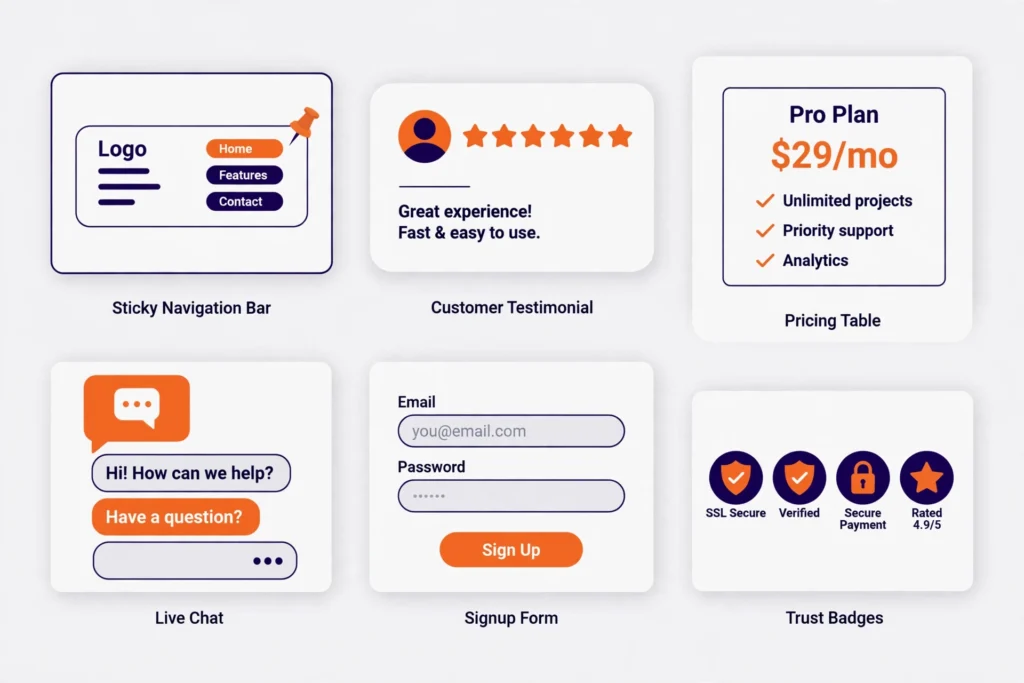
You don’t need Dell’s budget to use these. Every pattern below is achievable on a standard Webflow build:
| Pattern | What it does | Seen on |
|---|---|---|
| One clear hero CTA | Removes decision paralysis — one button, one action | Webflow, Dropbox, Jasper |
| Interactive product demo | Lets visitors experience value before committing | Typeform, Weglot, Jasper |
| Social proof above the fold | Logos, ratings, or stats visible without scrolling | Typeform, Jasper, UpGuard |
| Persistent/sticky CTA | The signup or contact button follows the scroll | Dropbox, Memberstack |
| Low-friction trial or tool | Free trial, free audit, or free assessment captures leads | Jasper, UpGuard, Weglot |
| Transparent pricing path | Pricing reachable in one click — no “contact us” wall | Weglot, Memberstack |
| Case-study proof pages | Real projects with outcomes build trust for services | Refokus, UpGuard |
Notice what’s missing from every example: popups that fire instantly, auto-playing videos with sound, and carousels hiding key messages. High-converting Webflow websites respect the visitor’s attention.
Mistakes These Sites All Avoid
- Vague hero headlines. None of them say “Welcome to our website” or “We deliver excellence.” Every hero states what the product does and for whom.
- CTA overload. You’ll see one primary action per screen, not five competing buttons. Secondary links stay quiet in the nav.
- Slow media. Image-heavy brands like Michael Kors still load fast — Webflow’s automatic responsive images and CDN do the heavy lifting. If your site feels slow, our Webflow vs WordPress comparison covers the performance differences in detail.
- Mobile afterthoughts. Every one of these sites is designed mobile-first. With most B2B and B2C traffic now on phones, a desktop-only design is a conversion leak.
- Buried contact paths. Whether it’s a trial signup or a contact form, the path to “talk to us” is never more than one click away.
How to Get a Webflow Site That Converts Like These

Studying examples is step one. Step two is applying the patterns to your business — your audience, your offer, your funnel. That’s where most DIY builds stall: the patterns are public, but the judgment calls (which CTA, which proof, which page structure for your buyers) take experience.
A practical starting point: get an honest, expert review of your current site against these benchmarks. Our free website audit scores your site on conversion fundamentals — messaging clarity, CTA placement, speed, mobile experience, and SEO — and tells you exactly what to fix first. Startups exploring the platform should also read our guide on why SaaS companies are switching to Webflow in 2026 for the business case behind the move.
FAQs About Webflow Website Examples
Are these websites really built with Webflow?
Yes — each site above is publicly documented as running on Webflow (several are featured in Webflow’s own customer stories and showcase). Platforms change over time, so if a specific site has since migrated, the conversion patterns it demonstrates still apply.
Can a small business website convert as well as these big-brand examples?
Absolutely — often better. Small businesses can move faster: fewer stakeholders, clearer offers, and a single call to action. The patterns (clear hero, social proof, sticky CTA, fast load) are platform features, not budget features.
Do Webflow sites rank on Google as well as WordPress sites?
Yes. Webflow gives you full control over the technical SEO fundamentals — clean code, meta tags, heading structure, sitemaps, and schema. Rankings come down to content quality and authority, not the CMS badge. Our Figma to Webflow guide also covers how design choices affect SEO.
How much does a high-converting Webflow website cost?
It depends on scope, but as a reference our simple business websites (5–10 pages) run $399–$699 and ecommerce builds $699–$1,200, with typical timelines of 7 and 15 working days respectively. What matters more than the build cost is the conversion architecture — a cheaper site with the right CTA structure will outperform an expensive pretty one.
Should I redesign my current site in Webflow or improve what I have?
If your current site is slow, hard to update, or built on a rigid template, a rebuild usually pays for itself in saved maintenance time and better conversion. If the foundation is solid, targeted conversion fixes (hero, CTAs, speed) may be enough — which is exactly what a free website audit will tell you.
Final Takeaway
The best Webflow website examples share one trait: every design decision serves a conversion goal. Clear heroes, interactive proof, social trust, and frictionless next steps — none of it is accidental. Borrow the patterns, adapt them to your buyers, and measure what changes. And if you’d like a partner to build it right the first time, our Webflow development services cover everything from strategy and design to launch and ongoing optimization.